
Home : Linux :
 click2dial.pl (c2d) is a simple WWW and CLI dialer for Google Voice (free PSTN) and CallCentric (free SIP to SIP). It has the most features and is easiest to setup, configure and maintain when used on a web server. click to dial is written in Perl and should work on any *nix system.
Requirements:
CGI (perl-cgi pkg)
LWP::UserAgent (perl-libwww pkg)
Crypt::SSLeay (perl-SSLeay pkg)
Features:
Alphanumeric, 7/10/11 digit and SIP URI dialing are supported
Google voicemail check and playback (mplayer required for CLI playback)
When a (name /) number is dialed (web), it is stored and can be redialed with a click
Stored numbers (web) can be dialed by name when using the CLI
Provides for up to 6 callback numbers, 3 for GV and 3 for CC
Has optional dialpad for touch screens (refresh after enabling)
Stores cookies so no login is required to make a call (noticeably faster)
Cookies are automatically reset when they expire
Ability to send SMS messages from the web and CLI
...currently unavailable due to a server failure/change.
...Google calls no longer work and I haven't found a way to fix it.
[ comment | link | top ]
Software
Most of the software I use comes on the distribution CD/DVD. Sometimes the software I like/need is in alternative repositories, sometimes I have to go to the source and sometimes I write my own (c2d, PPWeb and DWS). See also: Multimedia.
Google Voice and CallCentric Dialer
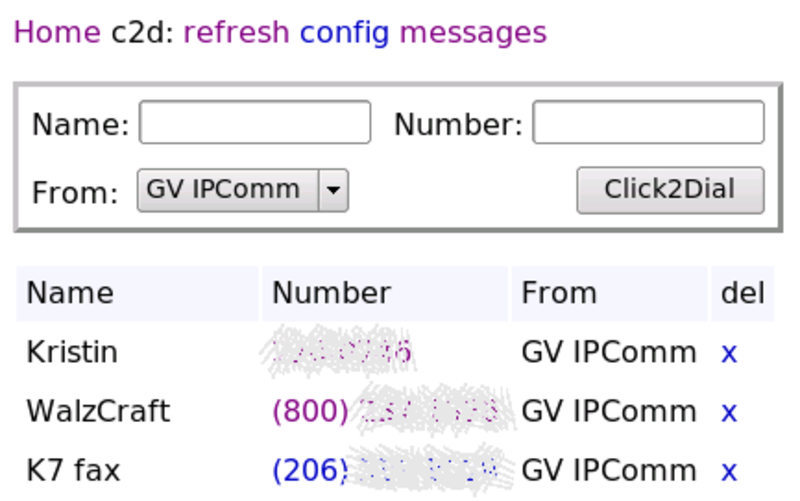 click2dial.pl (c2d) is a simple WWW and CLI dialer for Google Voice (free PSTN) and CallCentric (free SIP to SIP). It has the most features and is easiest to setup, configure and maintain when used on a web server. click to dial is written in Perl and should work on any *nix system.
Requirements:
CGI (perl-cgi pkg)
LWP::UserAgent (perl-libwww pkg)
Crypt::SSLeay (perl-SSLeay pkg)
Features:
Alphanumeric, 7/10/11 digit and SIP URI dialing are supported
Google voicemail check and playback (mplayer required for CLI playback)
When a (name /) number is dialed (web), it is stored and can be redialed with a click
Stored numbers (web) can be dialed by name when using the CLI
Provides for up to 6 callback numbers, 3 for GV and 3 for CC
Has optional dialpad for touch screens (refresh after enabling)
Stores cookies so no login is required to make a call (noticeably faster)
Cookies are automatically reset when they expire
Ability to send SMS messages from the web and CLI
...currently unavailable due to a server failure/change.
...Google calls no longer work and I haven't found a way to fix it.
[ comment | link | top ]
Newsgroup Software
Many years ago I used Agent for reading newsgroups and email. When I first started using Linux I used Pan for reading newsgroups. When I got hooked on downloading binaries I started using BNR2 and stuck with it for more than a few years. I have tried a few other readers. KLibido looked interesting but I couldn't set the download speed and I missed BNR2's speed/time to go tab. NZB's, files containing the information needed to download a collection of files, have made downloading an easy task. While BNR2 is perfectly adequate, there are newer programs that are designed around the use of NZB's. I landed on NZBGet and ended up writing PPWeb to go with it.
Pan note: Pan will download nzb contents if the nzb is saved as ~/.pan2/tasks.nzb. When Pan is (re)started the contents will be saved to ~/. There's probably a better way, but using the import nzb option didn't do anything for me (could be a setup issue).
[ comment | link | top ]
Pan note: Pan will download nzb contents if the nzb is saved as ~/.pan2/tasks.nzb. When Pan is (re)started the contents will be saved to ~/. There's probably a better way, but using the import nzb option didn't do anything for me (could be a setup issue).
[ comment | link | top ]
Wine: Autosketch 9
I've used Drafix CAD for too many years. I have previously tried to get it running on Wine with no luck. AutoSketch is based on Drafix CAD and something I could learn to live with (minimal learning curve) if I could get it running on Linux... so far no go. (details of that attempt removed)
'19: Revisited this (wine64 + wine32 on PCLOS TDE mini) and both Drafix CAD (2.1/3.0) and AutoSketch (9) work now. Registering AutoSketch generates errors but dismissing them, continuing and trying things (alternate method?) finally got me through (no more startup nag). Printing errors require installing cups-pdf package (edit /etc/cups/cups-pdf.conf to change default print directory, e.g. ~/PDF > ~/Documents) and, in my case, KGhostview (trinity-kghostview). Closing all files before exiting AutoSketch prevents 'Application - Fatal Error' issue. While I hate how AutoSketch messed with Drafix CAD snaps, it is otherwise easier to use (file dialog boxes, scroll zoom/button pan, etc.). When a newer DXF is needed (e.g. for Inkscape), I use QCAD (which can open most/all .dxf files) to update it.
[ comment | link | top ]
'19: Revisited this (wine64 + wine32 on PCLOS TDE mini) and both Drafix CAD (2.1/3.0) and AutoSketch (9) work now. Registering AutoSketch generates errors but dismissing them, continuing and trying things (alternate method?) finally got me through (no more startup nag). Printing errors require installing cups-pdf package (edit /etc/cups/cups-pdf.conf to change default print directory, e.g. ~/PDF > ~/Documents) and, in my case, KGhostview (trinity-kghostview). Closing all files before exiting AutoSketch prevents 'Application - Fatal Error' issue. While I hate how AutoSketch messed with Drafix CAD snaps, it is otherwise easier to use (file dialog boxes, scroll zoom/button pan, etc.). When a newer DXF is needed (e.g. for Inkscape), I use QCAD (which can open most/all .dxf files) to update it.
[ comment | link | top ]
Repositories
Many distributions, while having loads of software, are incomplete/crippled. For one reason or another they cannot/don't (e.g. licensing) include many useful programs. Repositories like the following fill the gap.
PLF for Mandriva (Easy Urpmi)
Packman for Suse
RPM Fusion for Fedora and RHEL (a merger of Dribble, Freshrpms and Livna)
[ page | comments (2) - Tuesday, 18-Nov-2008 | top ]
PLF for Mandriva (Easy Urpmi)
Packman for Suse
RPM Fusion for Fedora and RHEL (a merger of Dribble, Freshrpms and Livna)
[ page | comments (2) - Tuesday, 18-Nov-2008 | top ]
Links
- BNR
- ...news reader software specifically tailored for binary articles.
PAN is great for text but I prefer BNR for binaries... now NZBGet.
See also: KLibido - This looks promising but there's been nothing new since Mar '06 (not that BNR2 is in active development either). You cannot set a download speed limit and the program tab is static (BNR2 tab shows speed/time left). While my first impression is that I like it, I won't be using it because I cannot throttle the download speed. One handy aspect is that there is a KLibido package in PLF (Mandriva) and all directory locations are customizable (not for/in BNR2).
[ comment | link | top ]
- Brother Drivers
- Finally used the Brother CUPS drivers (lpr and then wrapper rpms) for an MFC-210c on Mandriva 2007. It works fine for printing, haven't explored scanning or faxing yet
...Before installing the scanner driver I tried using the Mandriva Control Center to install the scanner resulted in Sane and Kooka being installed. Manually selecting the MFC-210c didn't result in a working scanner. When I installed the Brother Scanner driver, the MFC was auto detected and I got a working scanner. Since Kooka was installed by Mandriva, I probably didn't need to install Xsane (done per Brother instructions).
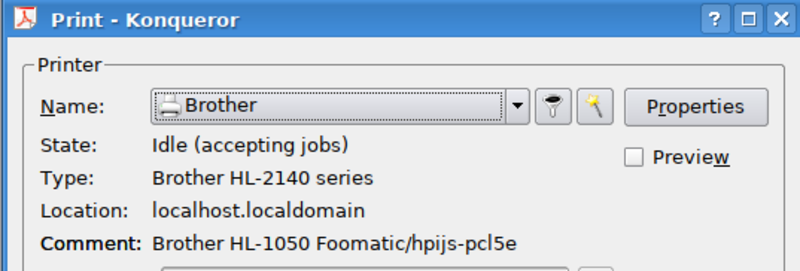
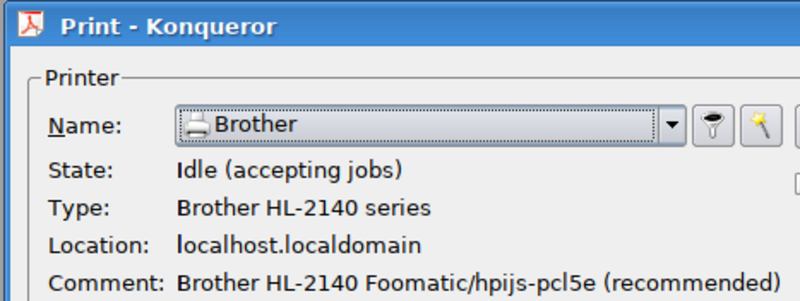
...For PCLOS MiniMe (a HL-2140 this time) : installing the task-printing-server rpm, drivers from the brother site, and using the cups web interface (http://localhost:631/) for configuration may be all that's needed (hard to backtrack/test at this point)... 5/20 New install/setup didn't work (2 blank pages and stays in the queue), manually adding below recommended/generated PPD using TDEPrint got the printer working. (...even though I initially used the default 1050 instead of selecting 2140 from the drop-down).
openprinting.org recommends the hpijs-pcl5e driver. It may be something I don't have installed, but the default driver (ghostscript?) just feeds blank pages until all the paper is gone. The recommended pcl5e works fine.
[ comment | link | top ]
- JBidWatcher
- A Java-based [auction tracking/bidding] application ... known to work cleanly under Linux, Windows, Solaris, and MacOSX from the same binary.
I switched to JBidWatcher because Bidwatcher wasn't keeping current/functional (busted since '05). Initially it wasn't a good thing but JBidWatcher stays on top of eBay changes and has become a pretty nice and feature rich program.
I put the .jar in my home directory and create a 'link to application' with the command java -jar JBidWatcher-[version].jar
Apr '09: If you put the .jar someplace else (e.g. the /.jbidwatcher directory), you need to use the full path to the .jar (java -jar /path/to/JBidWatcher-[version].jar). The following was just an oddity on an old system and it distracted me from the basics.
May '07: It can be busted. I don't remember doing anything with Java but JBidWatcher wouldn't work and the fix was to install Sun's Java. In Mandriva, /usr/bin/java is a link to /etc/alternatives/java which in turn is a link to the actual java executable.
The Sun java was in a different part of the file tree than the Mandriva java. Once I found the new java I tried starting JBidWatcher with it (/usr/java/jre1.6.0_01/bin/java -jar JBidWatcher-1.0.1.jar).
I then renamed /etc/alternatives/java to /etc/alternatives/java.bak (in case the next step didn't work or I wanted to revert back) and created a new /etc/alternatives/java which linked to the new /usr/java/jre1.6.0_01/bin/java.
... Linking to /usr/java/latest/bin/java would probably be better. It links to jre1.6.0_01 and presumably is changed to link to newer (Sun) versions, i.e. you don't have to change the /etc link with future upgrades.
[ comment | link | top ]
- mvb
- "mvb is a shell script written for *BSD and Linux users, to "batch rename" files (change the name of many files at once) in the current working directory."
It was the first thing I found and it did what I needed it to do. I was looking for something that would preserve my existing alphanumeric name sort and it does that by default (can also be date based). I stuck the script in /usr/local/bin and simple usage is:
[file_dir]$ mvb new_name
Numerical sequence will be added to new_name
Oct '07: Haven't used it but noticed a krename pkg for KDE
[ comment | link | top ]